

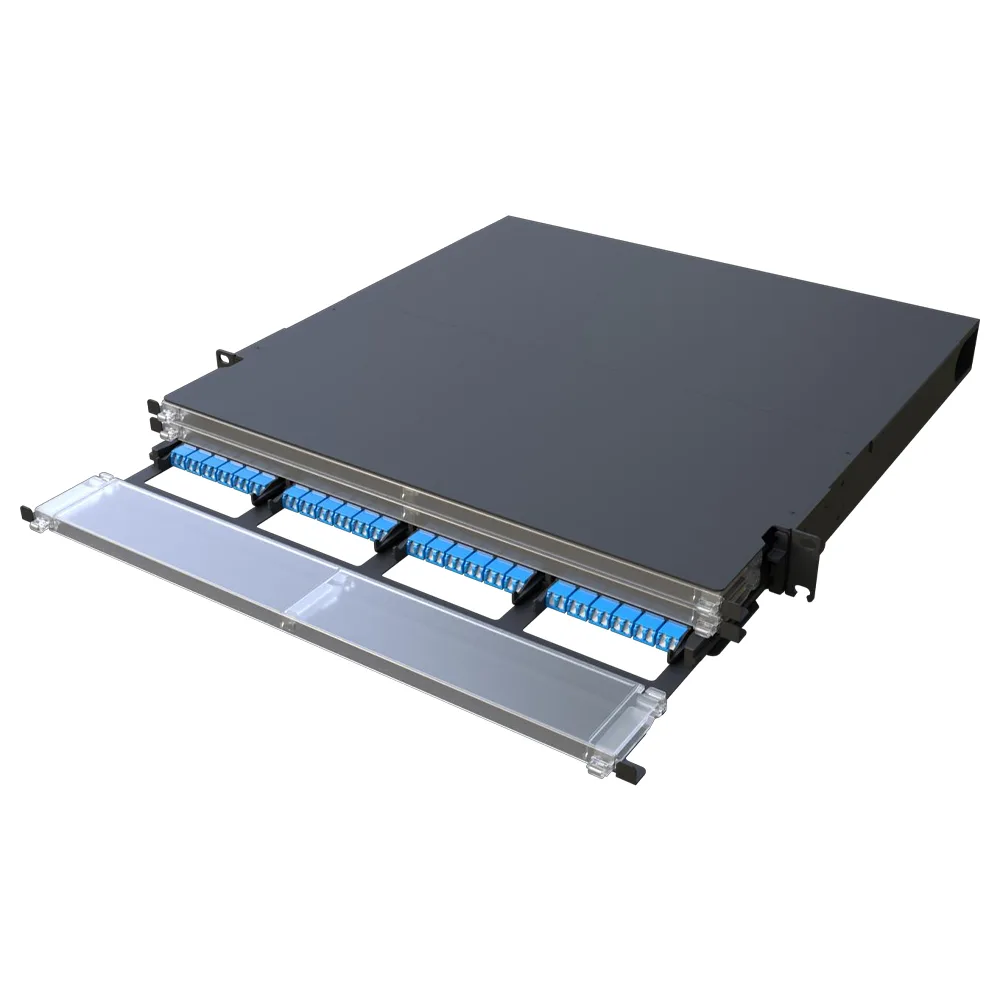
Short answer: To choose a fiber patch panel, match four things: port density (48 to 288+ fibers per unit), connector module type (LC duplex cassettes, MPO/MTP cassettes, or MMC assemblies), form factor and cable management (slide-rail, modular, or fixed designs), and the deployment area (MDA, IDA, or HDA in data centers). Confirm the panel supports your fiber count, adapter counts, and cable storage needs before purchase.
Why Fiber Patch Panel Selection Matters
The fiber patch panel is the termination and patching point where backbone cables meet active equipment. A panel that is too sparse wastes rack space; one that is too dense without proper cable management creates bending loss and makes MACs (moves, adds, changes) risky. As data centers move toward higher port counts and AI-driven network expansion, selecting the right panel is as important as selecting the right transceiver.
Step 1: Decide Port Density and Fiber Count
Start with the number of fibers you must terminate and the rack units you can afford. ADTEK’s GPX series covers a wide range:
- GPX02 slide-rail panel: 1U supports up to 48-core wiring, with metal slide-way pulling and self-locking function.
- GPX10 slide-rail panel: aluminum alloy slide-way, up to 72-core wiring with removable top cover and side outlets for coil fiber protection.
- GPX18 fixed distribution frame: 1U/2U fixed design, highest support of 1U 96-core fiber, removable upper cover for easier fiber melting.
- GPX31 slide-rail panel: supports 1U/96, 2U/192, 3U/288, 4U/384 core wiring with transparent acrylic plate.
- GPX41 slide-rail panel: 2U-288 core wiring, high-density design saves wiring space and reduces wiring costs.
- GPX70 modular patch panel: designed for next-generation ultra high-density data centers, optimizing every rack unit with up to 72 connections per RU.
- GPX62 extreme high-density (XHD) patch panel with MMC assemblies: tailored for modern AI-driven networks, handling backend, frontend, and in-band management.
For ultra-high-density scenarios, ADTEK’s 432F MDC patch panel shows how compact connectors can push density further in the same footprint.
Step 2: Choose Connector Modules and Interfaces
The module type determines which connectors and trunk cables the panel accepts. Options in the GPX portfolio include:
- MPO-to-LCD cassettes for high-density trunking, bridging parallel optics to LC duplex connections.
- LCD faceplates with integrated breakout management for enhanced cable organization.
- Splice cassettes for direct fiber termination and fusion splicing at the panel.
- MMC assemblies in the GPX62 for extreme high-density deployments in AI-driven networks.
Connector compatibility matters: LC is the dominant connector for modern transceivers, SC is common in FTTH and enterprise networks, and MTP/MPO supports high-density parallel optics. For a full comparison, see our MPO vs MTP guide. For how port density evolved from LC toward MMC, read From LC to MMC: Rethinking Port Density in Next-Generation Data Centers.
Step 3: Evaluate Form Factor and Cable Management
Different operating environments call for different panel mechanics:
- Slide-rail panels (GPX02, GPX10, GPX31, GPX41) let installers pull the tray out for front access; self-locking mechanisms keep the tray stable during patching.
- Modular panels (GPX58, GPX70) use independent module boxes. The GPX58 features a press-and-lock mechanism, dual sliding rails with three locking positions, and tray tilt for rear cable operations.
- Fixed frames (GPX18) trade moving parts for a simpler, lower-cost structure where frequent access is not required.
- Guide-rail designs (GPX51 / GPX51 A2) let the module box lock securely upon insertion and unlock by pulling the handle, simplifying daily operation.
Front cable management reduces the risk of disturbing active connections during MACs. The GPX70 uses three independently operating trays for segregated front patch cord management, and its generous channels comfortably host even 2.0 mm patch cords. A dual-level labeling system and transparent front cover with RFID-ready design support traceability at scale.
Step 4: Patch Panel vs ODF: Match the Device to the Area
A common confusion is choosing between a patch panel and an ODF. Fiber optic patch panels are modular, rack-mount patching platforms designed for high-density cabling inside data centers, while ODF frames are dedicated fiber distribution frames for fiber optic communication rooms, providing cable fixing, protection, splicing, and line scheduling. In a typical deployment, patch panels handle patching between active equipment and cabling, while ODFs manage incoming backbone fibers and their distribution. For details, see our article on the difference between fiber optic patch panels and ODF patch panels. ADTEK’s GPX60 ODF unit, for example, integrates fiber splicing, termination, and cable storage into a single modular unit for telecommunication fiber networks.
Step 5: Plan for Application Environments
Choose the panel that matches where it will be deployed:
- Data center MDA (Main Distribution Area): backbone connection and distribution across the facility; high-density modular panels such as GPX70 and GPX62 fit here.
- IDA (Intermediate Distribution Area) and HDA (Horizontal Distribution Area): spine-leaf interconnection and SAN switch connectivity are typical configurations supported by the GPX series.
- DWDM breakout: modular combinations allow wavelength-division multiplexing fan-out in the same panel footprint.
- Telecommunications networks: ODF-style units such as GPX60 provide splicing, termination, and storage in one frame.
For cable-side considerations such as attenuation and link budget, review our fiber optic attenuation guide; for polarity planning across high-density trunks, see our fiber optic polarity guide; and for the patch cords that complete the link, use our fiber patch cord selection guide.
Fiber Patch Panel FAQ
How many fibers can a 1U patch panel hold?
ADTEK GPX panels cover 48-core (GPX02), 72-core (GPX10), 96-core (GPX18 and GPX31 in 1U), and higher counts in 2U–4U frames. The GPX70 reaches up to 72 connections per rack unit.
Should I use LC cassettes or MTP/MPO trunks?
MPO-to-LCD cassettes convert parallel-optic trunks to LC duplex interfaces for transceiver compatibility. If the network already uses parallel optics end to end, MMC or MTP-based panels such as GPX62 provide higher density. Refer to the MPO vs MTP guide for the trade-offs.
What is the difference between a fiber patch panel and an ODF?
Patch panels are modular patching platforms inside data centers; ODFs are dedicated distribution frames that fix, protect, splice, and schedule backbone cables in fiber optic communication rooms. Read the full comparison for details.
Can I add modules later to a modular patch panel?
Yes. Modular designs such as GPX58 and GPX70 allow each module box to be operated independently, so capacity can be expanded without replacing the frame.
ADTEK is a high-tech enterprise and a leading OEM manufacturer and exporter of optical fiber communication devices. For the full patch panel portfolio, see GPX70 modular patch panel, GPX62 extreme high-density MMC patch panel, GPX58 modular patch panel, GPX51 high-density patch panel, and GPX60 ODF unit.